
Description
All-in-One Android & iOS File Manager
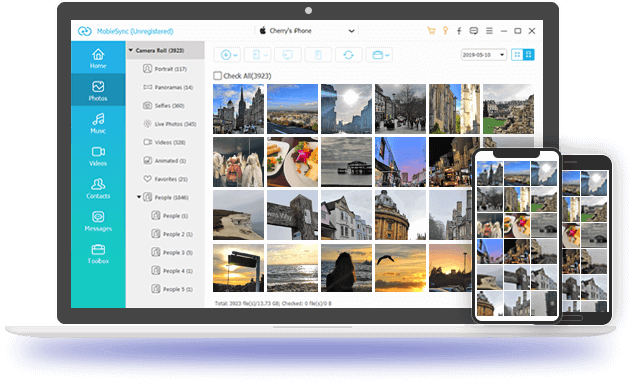
As a powerful smartphone manager, MobieSync enables easy data transfer between Android, iPhone/iPad/iPod, and computers. All commonly used data types are supported, including contacts, pictures, videos, music, messages, and voice memos. Before transferring, you can preview and play files in real time. Furthermore, this software allows you to backup and restore contacts and create personalized ringtones. MobieSync also lets you convert HEIC images on your phone to popular JPEG or PNG photo formats.
Transfer iPhone data
Backup & Restore
Manage mobile data
Android data transfer
HEIC Converter
Ringtone Maker
One-click data transfer between Android, iOS & PC
between iPhone, iPad and iPod touch.
Export various files from Android to Android.
Copy data from iOS to Android or from Android to iOS.
Easily backup photos, music, playlists from phone to PC.
Supported file types
Photos
Music
Video
Contact
SMS
Manage, add, delete & backup mobile data
Music & Video
Photos & Images
Contact
News
Music & Video
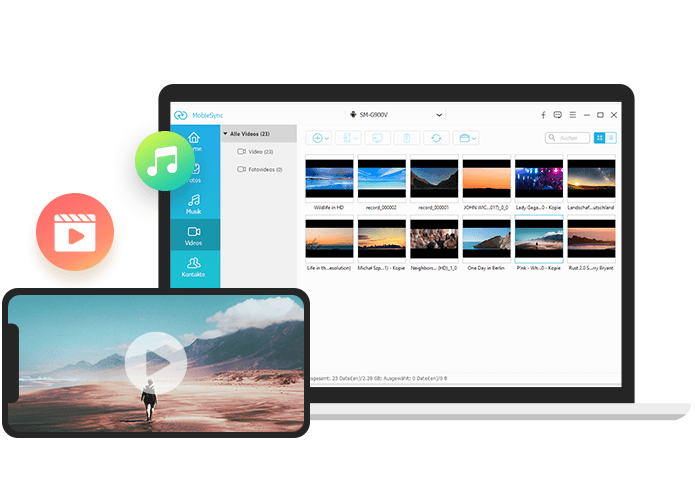
MobieSync, a powerful mobile manager, supports a wide variety of files, including music and videos. As long as you connect your Android or iPhone smartphone to the software, you can view and play songs and videos from your phone in MobieSync. You can then transfer your phone data to your PC or laptop. Conversely, you can also transfer songs, movies, and video recordings from your PC to your phone. You can also sync these media files between different iPhone or Android phones and delete unnecessary files from your smartphone.
Supported devices
Samsung
Galaxy S10/S9, Galaxy Note 9/8, Galaxy A6/J7/J3, Galaxy S8+/S8/S7/S7 edge
Google Phone
Google Pixel 3a XL, Google Pixel 3 XL, Google Pixel 2 XL, Google Pixel 2, Google Pixel XL
Huawei
HUAWEI Mate 20/20 Pro/20X, HUAWEI Mate 10/10 Pro/9, HUAWEI Mate SE, HUAWEI Elate, HUAWEI P30/P30 Pro, HUAWEI P20/P20 PRO, HUAWEI Nova 4
iPad
iPad Pro, iPad 9, iPad 4, iPad 3, iPad 2, iPad Air, iPad Air 2, iPad mini 6, iPad mini 5, iPad mini 4, iPad mini 3, iPad mini 2, iPad mini
iPhone
iPhone 16/16 Plus/16 Pro/16 Pro Max/16e, iPhone 15/15 Plus/15 Pro/15 Pro Max, iPhone 14/14 Plus/14 Pro/14 Pro Max, iPhone 13/13 mini/13 Pro/13 Pro Max, iPhone 12 Pro Max/12 Pro/12/12 mini, iPhone 11 Pro Max/11 Pro/11, iPhone XS/XS Max/XR/X, iPhone 8/8 Plus, iPhone 7 etc.
Motorola
moto g⁷, moto g⁷ power, moto g⁷ play, moto g⁶, moto g⁶ play, moto e⁵ plus, moto e⁵, moto e⁵ play
LG
Samsung Galaxy A52 2018, Samsung Galaxy A52 2018, Samsung Galaxy A52 2018, Samsung Galaxy A52 2018
Other
Nokia, Sony, OnePlus, XiaoMi, ZTE, OPPO, BlackBerry, Doro, Razer, Wileyfox, Binatone, Acer
iPod
iPod touch 7, iPod touch 6, iPod touch 5, iPod touch 4
Additional functions
HEIC Converter
Can’t open HEIC files on your PC? The HEIC Converter allows you to convert HEIC files to JPG and PNG.
Ringtone Maker
A simple ringtone maker creates iPhone M4R ringtones from music and copies ringtones directly to iPhone.
Organize data
With one click, you can easily drag data between albums, playlists, contact groups and quickly organize files.
Safe & Reliable
MobieSync is the simple and secure contact management software and it claims not to lose any data on your device.
How to use MobieSync
Step 1 : Open MobieSync and connect your phone to the computer using a USB cable.
Step 2: Click the file type you want in the left side list, and here you will find the files on the device.
Step 3 : Click Transfer to Device or Export to PC to start the file transfer.


Reviews
There are no reviews yet.