


Description
Convert over 500 video/audio formats
Aiseesoft Video Converter Ultimate uses the world’s most advanced video conversion technology. It now supports all encoding formats, including H.265/HEVC, H.264, Xvid, VP8, VP9, and more, in over 500 formats, including MP4, AVCHD, AVI, MOV, MPEG, WMV, and more. With the latest conversion engine, you get the fastest conversion speed with original picture and sound quality. Whether you want to convert 4K to 1080p, convert HD to HD, or simply convert 4K formats, this video converter is the best choice for you. Processing 5K and 8K video files is also no problem with this video converter.
30x faster conversion speed
Aiseesoft Video Converter Ultimate features the world’s most powerful video encoding technology, making it the fastest video converter in the world. It supports GPU-accelerated encoding technology, including NVIDIA, CUDA, AMD, and Intel. With powerful CPU-based video decoding technology, the software converts 8K, 5K, 4K, and 1080p HD videos at 30x faster speed without any quality loss.
6x faster
Blu-Hyper CPU video decoding technology
15x faster
Blu-Hyper CPU image processing technology
30x faster
Blu-Hyper CPU video encoding technology
Wonderful editing features
Filters & Effects: Aiseesoft Video Converter Ultimate offers a variety of video editing filters. You can apply your desired filter to your video with one click, including whirlpool, Hong Kong film, orange dots, purple, simple, coordinates, warm, starts, modern, gray, pixelated, and sketch filters. Choose one that suits your video. In addition, you can adjust basic effects like contrast, saturation, brightness, and hue.
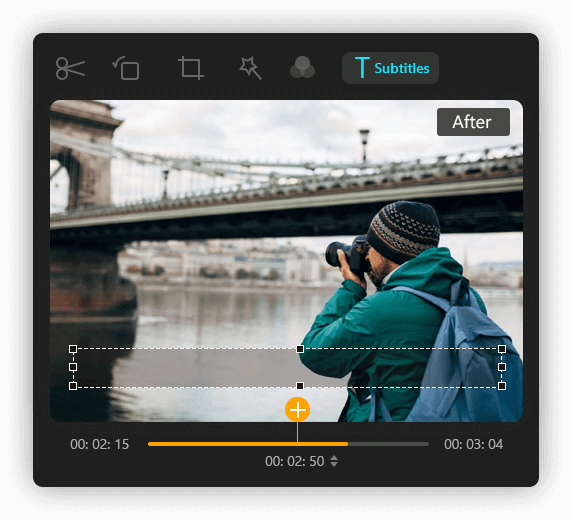
He takes a photo of the bridge.
Adjust Subtitles and Audio Tracks It would be frustrating if the subtitles were out of sync with the audio. However, the built-in Delay feature of this powerful converter helps to make the subtitles unsynchronized with the video or audio track and synchronize the subtitles with the movie. Whether you plan to publish your video or not, you can add subtitles to the video. Aiseesoft Video Converter Ultimate allows you to add subtitles and customize available audio tracks.
Add 3D Effects to Video Watching 3D videos at home is very cool and exciting. But what if you don’t have any 3D movies? With the 3D Maker tool in Aiseesoft Video Converter Ultimate, you can easily add 3D effects to your video and enjoy the 3D experience with your 3D glasses easily and comfortably. Moreover, you can select the output format and choose a high output quality. It is capable of choosing anaglyph options, split screen options, depth, and the left-right option.
Additional editing functions…
Rotate & mirror
If the video is shot sideways, you can rotate it clockwise or counterclockwise. You can also flip the video files horizontally or vertically, depending on your needs.
Cropping
Want to remove those unwanted edges from your video? Simply use the crop feature to effortlessly remove all unwanted parts for a better visual experience.
Edit video
If you want to split a long video into multiple segments, this video converter will meet your needs perfectly. Using the slider, you can trim the video to the desired length.
Merge clips
This powerful editor also allows you to combine more than one video clip into a complete video file. So, it would be easier for you to merge separate videos after editing.
Improve video quality with AI
With Aiseesoft Video Converter Ultimate, you can improve video quality with artificial intelligence (AI) in many ways: upscale resolution, optimize brightness and contrast, remove video noise, and reduce video shake.
Upscale your low-quality videos to higher resolutions like 1080p and 4K.
Automatically optimize the brightness and contrast of your videos.
Remove video noise in your videos to make them clearer.
Reduce the problem of video shaking and get a more stable effect.
Create a Creative Split-Screen VideoWant to insert two or more videos into one frame and play them simultaneously? Aiseesoft Video Converter Ultimate provides a collage feature that lets you place videos side by side and combine them into a new video. For example, you can create a reaction video with multiple viewers, or a side-by-side video of you and your friend. Nowadays, there are various layouts, filters, and other video editing features that can enhance your video.
Perfectly remove watermark from video
This handy watermark remover helps you easily remove watermarks and logos from videos. With just a few clicks, the annoying watermark/logo will disappear. You can use this software to remove watermarks from TikTok videos, etc. With this best watermark removal software, you can directly select the watermark area and get an enhanced video in seconds. Moreover, you can remove multiple watermarks at once or remove watermarks within a specified time frame.
A simple Music Movie Maker
Aiseesoft Video Converter Ultimate offers you another convenient way to create music videos. With preset themes, you can quickly convert your photos and music into an impressive video. This MV feature is easy to learn, even for beginners.
This music movie maker offers many themes that you can use directly for your project. After selecting a specific theme, transitions, filters, and background music are automatically applied to your videos and photos.
Topics
Additional functions in the toolbox
Add a watermark To add your own logo to your video, you can add a text or image watermark to the video. You can adjust the color, degree, opacity, font, font size, and more.
Crop & Rotate Want to remove unwanted edges from your video? You can easily use the crop feature to change the video aspect ratio. You can also rotate the video clockwise or counterclockwise, and flip it horizontally or vertically.
Compress Video: AI Video Compressor lets you compress a large video into a small size. You can specify the output format, rename the clip, reduce its size, and change the bitrate. You can also preview the clip before compressing.
Trimming Videos: If you need to cut a long video into multiple segments, this program will meet your needs. You can trim the video to the desired length using the slider. You can also combine multiple segments into one complete video.
Edit ID3 Tag Want to add or edit a video’s ID3 information? The Media Metadata Editor lets you add ID3 tags such as title, artist, album, performer, genre, year, track, and comments, making the media file recognizable on the website.
Create GIFs: The GIF Maker tool lets you create high-quality animated GIF images from video clips such as MP4, MKV, AVI, WMV, and others. You can also edit and trim video clips with its powerful editing features.
How to use Aiseesoft Video Converter Ultimate
Video Converter
Video Editor
Video Compressor Step 1 : Click “Add Files” and upload one or more video files. Step 2: Click “High Speed Conversion” to enable 120x faster lossless conversion and hardware acceleration. Step 3 : Click the “Output Format” drop-down list and select an output format.
Step 4: Then select a location to save the output file and click “Convert All”.

Reviews
There are no reviews yet.